A diff is the most information-dense view in everyday computing: two whole documents compressed into just the lines that differ, plus enough context to place them. If that view has ever made your eyes glaze over, it is not a reading problem — it is a missing key. The notation is small, and once you have it, diffs become the fastest way to answer the question "what changed?" in code reviews, contract edits and config archaeology alike.
The three kinds of line
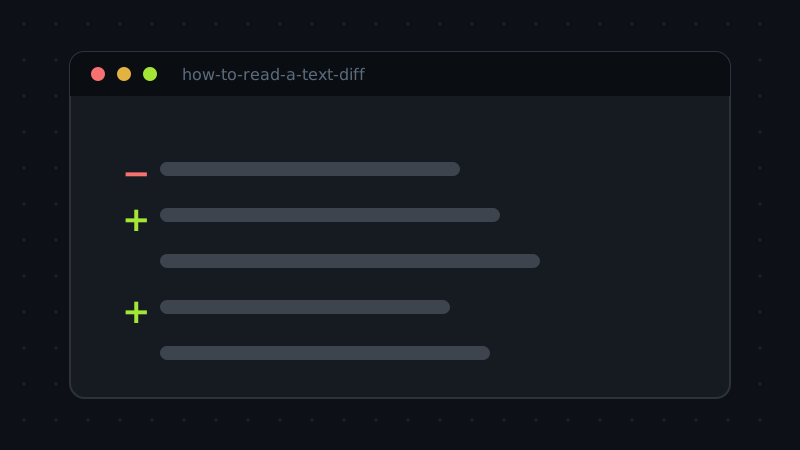
- Lines starting with − (or shown in red) existed in the original and are gone in the revision.
- Lines starting with + (or shown in green) are new in the revision.
- Unmarked lines are unchanged context — present in both versions, shown so the changes have a location.
An edit to a line appears as a pair: the old line removed, the new line added, adjacent to each other. Diff tools work line by line, so a one-word fix inside a paragraph still shows the whole line twice. That is normal, not noise — it is the price of a comparison that cannot be fooled.
Read the counts first
Before reading a single line, read the summary. "3 lines added, 1 removed, 240 unchanged" tells you the shape of the change: surgical. "900 added, 870 removed" in a 950-line file tells a different story before you look at anything — either a genuine rewrite or, more often, an accident you are about to diagnose. Reviewers who start from the counts calibrate their attention immediately: big diff, skim for the anomaly; small diff, read every character.
The whitespace trap
The classic fake-out: a diff that claims nearly every line changed when the document "looks the same". Suspects, in order: line endings flipped between CRLF (Windows) and LF, tabs converted to spaces or back, trailing whitespace trimmed by an editor, or the whole file re-indented after a configuration change. In each case every line differs at the byte level while saying exactly the same thing. The fix is to re-run the comparison ignoring whitespace (most tools offer the option), then read what remains — that residue is the real change, and it is usually tiny.
Hunks, headers and the @@ signs
When a diff comes from Git or a patch file rather than a side-by-side tool, you will meet one extra piece of notation: hunk headers like @@ -34,7 +34,8 @@. Read them as coordinates. The first pair says "in the original, this block starts at line 34 and spans 7 lines"; the second says "in the revision, it starts at line 34 and spans 8". A few lines of unchanged context bracket each change so the block can be located even as the file grows around it. You can ignore the arithmetic while reading — its real audience is the tool applying the patch — but recognising the headers stops the wall of text from looking like line noise and tells you how many separate regions of the file were touched.
A reading order that works
Start with the counts. Then scan only the removed lines, as a set: they are what the world used to say. Then scan the added lines the same way. Only then read the pairs in context, where each change sits among its unchanged neighbours. Reading removals and additions as separate stories first gives you the plot; the contextual pass gives you the details. Follow that order and even a several-hundred-line diff resolves into a short, checkable summary: this moved, this was reworded, this one line is the actual behaviour change — and it is usually exactly the line worth your full attention.
Try the tool behind this article: Diff Checker runs entirely in your browser — nothing you paste is uploaded.